 Clew
Clew The vault as a database
Queries
Your notes already carry data — frontmatter
properties record what each note knows about itself. A query fence collects that data across the whole
vault into a live table or list: every paper and its status, every book
and its rating, everything due this month. And because Clew's query
views are writable, the table is not a report you look at but
a surface you act on — retype a cell and the note it came from is
rewritten.
Notes as rows, fields as columns
Think of the vault as a database whose rows are notes. Each note contributes its fields from two places:
- Frontmatter — every key in the
---block:status,due,rating, whatever you have defined. Not Dataview's inlineKey:: valuefields: in this dialect those are description lists, and a query never sees them (why). - Built-ins — three fields every note has:
name(the file name without its extension),path(vault-relative), andmodified(the file's last-modified date, shown in ISO form,2026-08-23).
A query scans every Markdown note in the vault
(.md and .jmd files), skipping hidden folders
and machinery — .obsidian/, .clew/,
.git/, node_modules/, and
.trash/ never contribute rows. The scan happens at render
time, against the live files, which is what makes the views below
dashboards rather than snapshots.
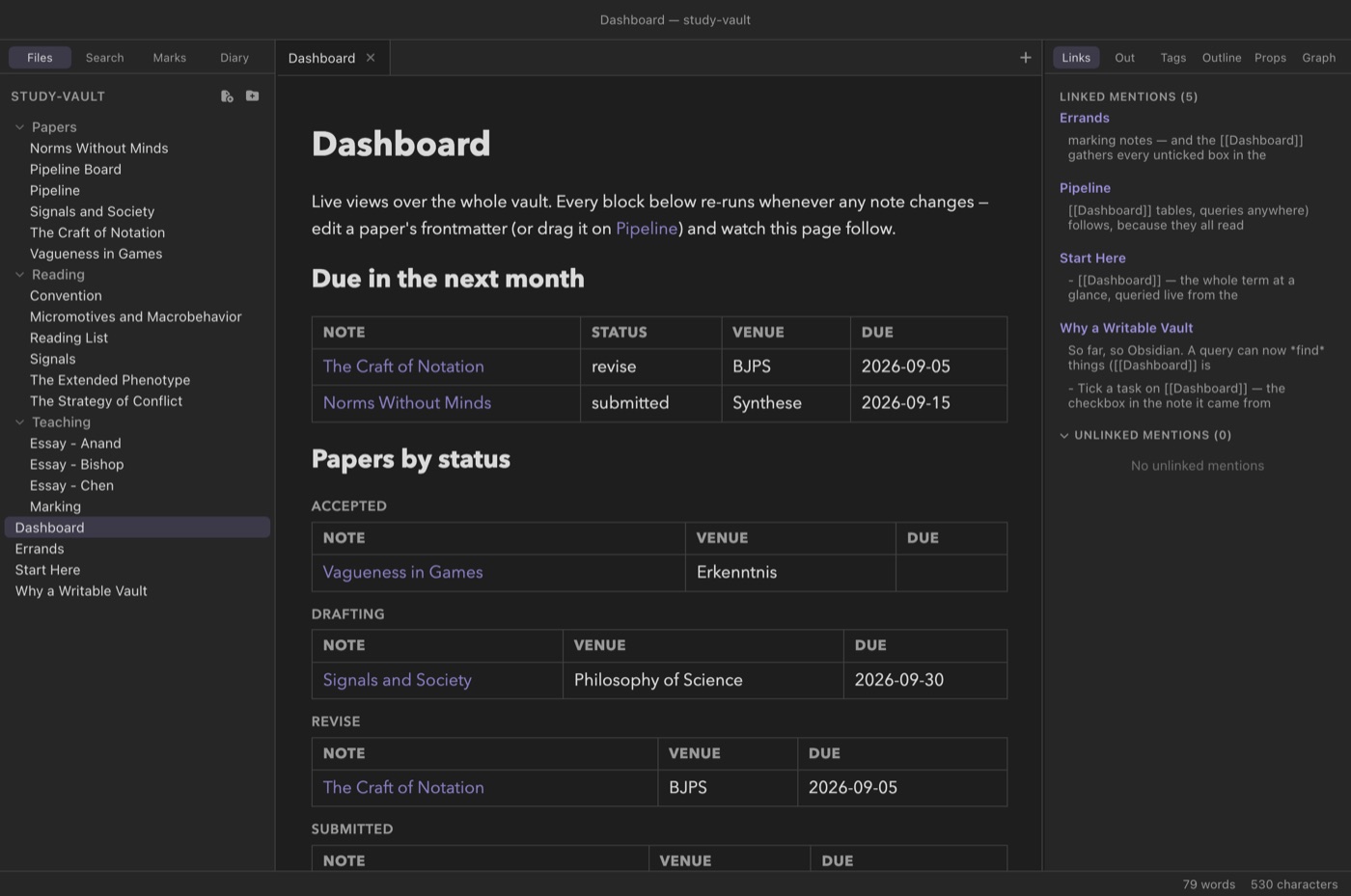
study-vault Dashboard: a due-soon table
built with date arithmetic, and the papers grouped by
status. Every block re-runs whenever any note in the
vault changes.A first query
A query is a fenced block whose body is a series of
key: value lines. With no other clauses the result is a
list of links (an explicit list: line requests that shape
by name). The smallest useful query names a folder:
You write
```query
from: Papers
```
Reading mode shows
With no other clauses you get the default output — a bulleted list of links, one per matching note, in alphabetical order by name. Every note in the folder counts, including Pipeline, the note that holds the folder's kanban board; filtering clauses (below) are how you narrow that down. Lines in the fence body that are not a recognised clause are ignored, and a query that matches nothing renders the message “No notes match this query.”
Tables
A table: line switches the output to a table and names the
columns, comma-separated. The first column is always
Note — a link to each matching note — and the rest are
fields:
You write
```query
table: author, status, rating
from: Reading
where: author
sort: rating desc
```
Reading mode shows
| Note | author | status | rating |
|---|---|---|---|
| The Strategy of Conflict | Thomas Schelling | finished | 10 |
| Convention | David Lewis | finished | 9 |
| Micromotives and Macrobehavior | Thomas Schelling | reading | 8 |
| Signals | Brian Skyrms | reading | 8 |
| The Extended Phenotype | Richard Dawkins | queued |
This is the study-vault reading list. Notice two things.
The Extended Phenotype has no rating yet, so its
cell is empty and it sorts to the bottom — notes missing the sort field
always sort last. And the where: author line is doing
quiet work: without it, the Reading List note itself (which lives in
the same folder but has no author) would appear as a row
of empty cells. A bare where: with just a field name is an
existence test — keep only notes where the field is present and not
empty.
Column values render as you would expect: missing fields are blank,
list values are joined with commas, and modified shows the
ISO date. Any column may also be one of the built-ins —
table: path, modified is a perfectly good audit view.
Choosing notes: from, tag, where
Three clauses select which notes become rows. They combine — a note must satisfy all of them.
from: — by folder
from: Papers keeps notes in the Papers folder
and any folder beneath it. The path is vault-relative and
matched as written (a trailing slash is tolerated:
from: Papers/ means the same thing).
tag: — by tag
tag: #active (the # is optional) keeps notes
whose tags property contains that tag,
case-insensitively.
tag: filter reads the note's
tags frontmatter property — a #hashtag in
the body of a note puts it in the tag pane, but does not make it
match a query's tag: clause. If you want a note to
answer tag queries, put the tag in its frontmatter.
where: — by field
A where: clause compares one field against one value:
You write
```query
table: course, marked, grade
from: Teaching
where: marked = false
```
Reading mode shows
| Note | course | marked | grade |
|---|---|---|---|
| Essay - Anand | PHIL201 | false | |
| Essay - Chen | PHIL201 | false |
That is the study-vault marking pile: as essays are
marked, they leave this table on their own. The operators are
=, !=, >, <,
>=, <=, and contains, plus
the bare existence form (where: due). The comparison rules
are worth knowing precisely:
- A note whose field is missing never matches a comparison — you do not need a separate existence guard just to compare.
- When both the note's value and the query's value are numbers, the
comparison is numeric:
where: rating >= 9means what arithmetic says it means. - Otherwise both sides are compared as case-insensitive text —
where: venue = synthesematchesvenue: Synthese. Text ordering is what makes ISO dates comparable (below). containstests list membership when the field is a list (where: tags contains fun), and substring containment when it is text — both case-insensitive.
where: may be repeated, and every clause must hold — the
clauses are ANDed. There is no OR; when you need one, two queries side
by side is the honest spelling.
Dates and date arithmetic
Because dates are ISO strings (2026-09-15) and text
comparison is lexicographic, date fields already sort and compare
correctly with no special machinery. What the query language adds is a
way to say now: when the value side of a
where: is a date expression, it is resolved to a concrete
ISO date at the moment the query renders.
The full grammar: the word today, optionally followed by
+ or - and a whole number of
days, weeks, months,
or years. Case does not matter and spacing is free —
today+7d and today + 7 d are the same. So:
today, today + 31d, today - 2w,
today + 6m, today - 1y. Anything else on the
value side is treated as a literal value, so comparing against a fixed
date — where: due < 2026-10-01 — also works.
The study-vault Dashboard's “due in the next month” view
combines an existence test with a window:
You write
```query
table: status, venue, due
where: due
where: due < today + 31d
sort: due asc
```
Reading mode shows
| Note | status | venue | due |
|---|---|---|---|
| The Craft of Notation | revise | BJPS | 2026-09-05 |
| Norms Without Minds | submitted | Synthese | 2026-09-15 |
(Rendered in late August 2026: Signals and Society, due 30
September, falls outside the 31-day window, and papers with no
due at all are kept out by the bare where:
due.) Since today is resolved when the note
renders, and query notes re-render as the vault
changes, a dashboard like this stays current without ever being
edited.
Sorting, grouping, limiting
sort: fieldorsort: field desc- Order rows by one field, ascending unless you say
desc. Numbers sort numerically when both values are numbers; everything else sorts as text. Notes missing the field sort last either way. Without asort:clause, rows come out alphabetically by note name. Sorting onmodifiedorders by the ISO date, so it distinguishes days, not minutes. group: field- Split the output into one section per distinct value of a field,
each section headed by the value and holding its own list or table.
Sections are ordered alphabetically by their label. Notes where the
field is missing or empty gather under a “—” section, which sorts
after the lettered ones — a useful catch-all for strays. A list
value groups under its joined text (
a, b), not one section per item. The Dashboard's papers-by-status view is exactlyfrom: Papers+group: status— and the Pipeline board note itself, having nostatus, turns up under “—”. limit: n- Keep only the first n rows, applied after filtering and
sorting (and before grouping).
sort: modified descwithlimit: 10is the classic “recently touched notes” block.
Editable cells: the writable database
Everything so far, a read-only query system could do. Clew's tables go one step further: the cells are editable, and edits are written into the source notes.
Click any field cell in a query table and it becomes an input. Type the new value and press Enter (or click away) to commit; Esc cancels. On commit, Clew writes the value into the note the row came from:
- If the field lives in frontmatter, the note's frontmatter is rewritten through the same parse/serialise machinery as the properties panel. The value is re-typed to match what it replaces — numbers stay numbers, booleans stay booleans, and a list field re-splits your comma-separated input back into a list.
- If the note does not have the field at all — an
empty cell — committing a value creates the property in that note's
frontmatter. Typing into the blank
ratingcell of The Extended Phenotype is how that book gets its rating.
The built-in columns (name, path,
modified) are facts about the file rather than fields in
it, so they are not editable. And the write respects the
frontmatter safety valve: a note
whose frontmatter is outside the editable subset refuses the edit with
a notice instead of risking the block. An edit can also fail cleanly if
the note changed underneath it — say, its frontmatter left the subset
meanwhile — in which case Clew reports it rather than guessing.
study-vault Marking note is just a
table of essays with where: marked = false — you put the
grade straight into the table and type true into the
marked cell, and the row leaves the pile because the
file now says so. No app state, no separate database: the
edit lands in the note, and every other view follows.
Live views
An open note that contains a query, tasks, or kanban fence re-renders
whenever any note in the vault changes — not just when
its own file does. Edit a paper's frontmatter, drag a kanban card, tick
a task, or let a sync tool rewrite a file behind Clew's back, and every
visible query view re-runs against the new state of the files. A note
of query blocks is therefore a real-time dashboard; the
study-vault Dashboard note is nothing else.
The same holds on the canvas: a note embedded on a canvas is a live preview, so a query table or kanban board embedded there stays current, and its cells and cards remain editable — edits route back to the source notes exactly as they do in reading mode.
The other query: embedded searches
Core Obsidian uses the same ```query fence for something
different — an embedded search, whose body is one search
expression rather than key: value lines. Clew serves both
from the one fence and tells them apart by the colon: from:
Projects (a space) is Clew's query language, tag:#project
path:"Areas" (no space) is a search. A search embed renders the
matching notes with their matching lines. Terms combine with AND,
"quotes" make phrases, tag:, path:
and file: scope it, - negates, OR
offers alternatives, and [property:value] matches
frontmatter. Regexes, parentheses, and line:/
section:/task: scopes are refused by name.
Scripting: the vault global
The fences cover the common shapes. For everything else, jmarkdown
script blocks — code the engine runs while it builds the note — see a
global vault object with three methods:
In a script block
const active = vault.query({ from: 'Projects', where: 'status = active' });
const everything = vault.notes();
const open = vault.tasks();vault.query(spec)- Run a query and return the matching notes. The spec is either a
string in the fence syntax (
'from: Papers\nwhere: status =
	drafting'
) or an object withfrom,tag,sort({ field, dir }),limit, andwhere— the latter a single clause or an array, each clause either a fence-syntax string ('rating >= 9') or a pre-parsed object. vault.notes()- Every note in the vault, unfiltered.
vault.tasks(spec)- Checkbox items across the vault, each with its text, done state,
source line, and the path and name of the note it lives in. The
optional spec is a string in the tasks-fence syntax; with no spec you
get the un-done tasks (the fence's default), and
vault.tasks('all')returns everything.
Each returned note is an object carrying path,
name, modified (a millisecond timestamp
here, not the ISO date), text (the full source), and
fm — the frontmatter record.
From there you can build any report the engine can render. This is the
programmable tier of the query system, the counterpart of Dataview's
dataviewjs.
Opening a vault that uses Dataview
Everything above is Clew's own fence. But a vault arriving from Obsidian
does not contain Clew's fence — it contains Dataview
queries, sometimes hundreds of them, and rewriting somebody's queries is
not a migration path. So Clew reads and runs
```dataview blocks directly, against the same index its own
queries use.
You write
```dataview
TABLE WITHOUT ID
  link(file.link, file.aliases[0]) AS "Subject",
  file.ctime AS "Added"
FROM "Reading" AND !"Reading/Archive"
WHERE contains(this.file.inlinks, file.link)
SORT file.ctime DESC
LIMIT 20
```
What works: TABLE (with WITHOUT ID and
AS aliases), LIST and TASK;
FROM over folders, #tags,
[[links]] and outgoing(), combined with
and/or and negated with ! or
-; WHERE (repeatable, all must hold),
multi-key SORT, FLATTEN (with AS,
including the FLATTEN list(expr) AS name idiom that binds a
computed value per row), GROUP BY with its real semantics —
one row per group, exposing key and rows, so
rows.file.name and FLATTEN rows AS R work —
and LIMIT, all applied in written order,
as Dataview applies them; lambdas like (x) => x.done
with filter, map, any,
all and none; the whole file.*
namespace including inlinks and outlinks;
this, meaning the note the query sits in; and around forty
functions. Cells over a field the note really stores stay
editable, just as in Clew's own tables.
Three Dataview facts that are easy to get wrong, verified here:
FROMtakes a path relative to the vault root, so the vault's own name never appears in a query. A vault whose notes live at the root wants noFROMat all (orFROM "").WHERE fieldon its own is a truthiness test, so a note whose field is a legitimate0is skipped.WHERE isnotempty(field)is the existence test.- A missing field is
null:WHERE field != nulldrops the notes that have no such field,WHERE field = nullfinds them, andtypeof(field)saysnullfor both an absent field and one set to null — the three agree, as they do in Dataview.
An inline query works too: `= this.file.name`
in the middle of a sentence renders the value.
What is refused, and why by name
file.lists, file.day, CALENDAR
queries, and a few functions (meta, embed)
are not implemented. A query using one renders a box naming it, rather
than running the rest — a query that silently dropped a clause would
show numbers that are wrong, which is worse than showing nothing.
meta() and
embed()), and two-thirds of the vault that exists to
teach Dataview. FLATTEN, real
GROUP BY … rows, and lambdas joined the subset when the
fifth vault showed them in genuine daily use.
dataviewjs
```dataviewjs blocks are JavaScript, not queries. Clew can
run them, but the setting is per vault and off by default
— turn on Run dataviewjs blocks in Settings for a vault you
wrote or trust, not for one you have just downloaded. Unlike a query,
whose unsupported parts can be listed before it runs, there is no telling
in advance what a script will do.
Inside a block, dv covers the querying and rendering
surface: dv.pages, dv.current,
dv.page, dv.tryQuery, dv.array,
dv.fileLink, dv.date, dv.duration,
and dv.table / list / taskList /
header / paragraph / span /
el. dv.view loads and runs another script from
the vault. The returned arrays chain the way Dataview's do —
.where().sort().limit(), and reading a property off the
array reads it off every element.
dv.app, dv.io and dv.luxon have no
Clew equivalent, and a block reaching for one says which one
rather than failing blankly. The same goes for the bare
app global that Obsidian scripts use, and for anything
asynchronous: notes render synchronously here, so a block using top-level
await is reported as such. Whatever a failing block had
already drawn is kept, above the explanation.
One bridge crosses that line: with the demo vault's
Charts plugin enabled, scripts get
Obsidian's renderChart(config, element) — also reachable
as window.renderChart, with this.container
accepted as the element, the way scripts in the wild call it. The
configuration is raw Chart.js, and it crosses from the render worker to
the preview as JSON, so it must be plain data: a config carrying a
function is refused naming the part that cannot make the trip, and
without the plugin the call fails by name like everything else.
Obsidian Bases
Bases is Obsidian's first-party database view, stored as
a .base file of YAML and embedded into notes like any other
file. Clew renders them: ![[Board.base]] shows the first
view, and ![[Board.base#Recent]] shows the view of that
name.
Board.base
filters:
  and:
    - note.categories.contains(link("Projects"))
    - '!file.name.contains("Template")'
formulas:
  Age: file.ctime
properties:
  file.name:
    displayName: Project
views:
  - type: table
    name: Recent
    filters:
      and:
        - last > now() - "60d"
    order:
      - file.name
      - status
    sort:
      - property: status
        direction: ASC
    limit: 20
Table, list and card views render, with the base's own
displayName headings, its filters (nested
and/or/not to any depth), its
computed formulas, sorting and limits. Map
views render too: every row whose coordinates
property yields a latitude and longitude becomes a marker on the same
Leaflet map the ```leaflet fence
draws — popups open the note, defaultZoom caps the fit, and
a markerColor that lands on a named marker color tints the
pin (markerIcon names Lucide icons Clew does not ship, so
pins stay pins). A view type Clew cannot draw says so rather than being
approximated with a table. Base filters query files, not only
notes, so a base over attachments behaves as it should. Columns over
stored fields are editable here too.
The same YAML can be written inline in a note as a
```base fence, which is a convenient way to try one without
creating a file.
Queries and export
Query views are a live feature of the app. When you publish a vault as a website, every query, tasks, and kanban view is baked into the exported pages as static HTML — the site shows the vault as it stood at export time. Single-note exports run under your own jmarkdown configuration rather than Clew's preview setup, so query fences are not evaluated there.
query fence is a fenced code block, so Obsidian shows
the query source as a code block — harmless, and honest about what
the note contains. Everything the query reads and writes is standard,
Obsidian-shaped data: plain frontmatter and body text. Edit a cell in
Clew and Obsidian sees an ordinary frontmatter change; there is no
Clew-only state anywhere in the note. The fence dialect itself is
Clew's own — close to Dataview in spirit, but not Dataview's query
language, which Clew reads
separately and in its own syntax.
Reference
| Clause | Meaning |
|---|---|
list: | Output a bulleted list of note links — the default when no table: is given. |
table: f1, f2, … | Output a table with a leading Note link column plus the named field columns. |
from: Folder | Keep notes in this vault-relative folder and its subfolders. |
tag: #name | Keep notes whose tags property contains the tag (# optional, case-insensitive). |
where: field | Keep notes where the field exists and is not empty. Repeatable; all clauses must hold. |
where: field op value | Keep notes where the comparison holds. Operators: = != > < >= <= contains. |
sort: field [asc|desc] | Order rows by a field (default asc; missing values last; default order is by name). |
group: field | One section per distinct value, ordered by label; missing/empty values under “—”. |
limit: n | Keep the first n rows (after sorting, before grouping). |
Obsidian's formats, read as they are written:
| Written | Clew |
|---|---|
```dataview | Runs — TABLE / LIST / TASK, FROM, WHERE, SORT, GROUP BY, LIMIT, file.*, this |
`= expr` | Runs — an inline query against the current note |
```dataviewjs | Runs only with Run dataviewjs blocks on for the vault (above) |
`$= expr` | Left alone — renders as the code span it is |
![[X.base]] | Renders the base's first view |
![[X.base#View]] | Renders the named view |
```base | Renders a base written inline in the note |
FLATTEN, rows, CALENDAR | Refused by name — the query is not run rather than partly run |
| Field | Built-in value | Editable |
|---|---|---|
name | File name without extension | No |
path | Vault-relative path | No |
modified | Last-modified date, ISO form | No |
| anything else | Frontmatter | Yes — writes back to the source note |
| Date expression | Resolves to |
|---|---|
today | Today's date, ISO form. |
today + Nd / today - Nd | N days from today, forward or back. |
today ± Nw | N weeks. |
today ± Nm | N calendar months. |
today ± Ny | N years. |
See also
- Properties and metadata — where the data lives, and the frontmatter safety valve the writes respect.
- Tasks and kanban — the other two database fences, built on the same scan.
- The canvas — query views inside embedded notes.
- Publishing as a website — query views baked static.
- The Note API — the other programmable surface: scripts that run in the rendered page rather than at build time.